How to send a password securely, with a note that reads once
Passwords, API keys and bank details sent by email or chat sit in both inboxes for years. A secret note is encrypted before it leaves your browser, opens once, and is then deleted. Here's how to send one and what happens to it.
Why not just email it?
An email or chat message is copied to the sender, the recipient, both providers' servers and usually a few backups. It stays in search results for as long as either account exists, so a password sent today is readable by anyone who gets into either inbox next year. A one-time note leaves nothing behind: once it's been read, there's nothing left to find.
How to send a secret note
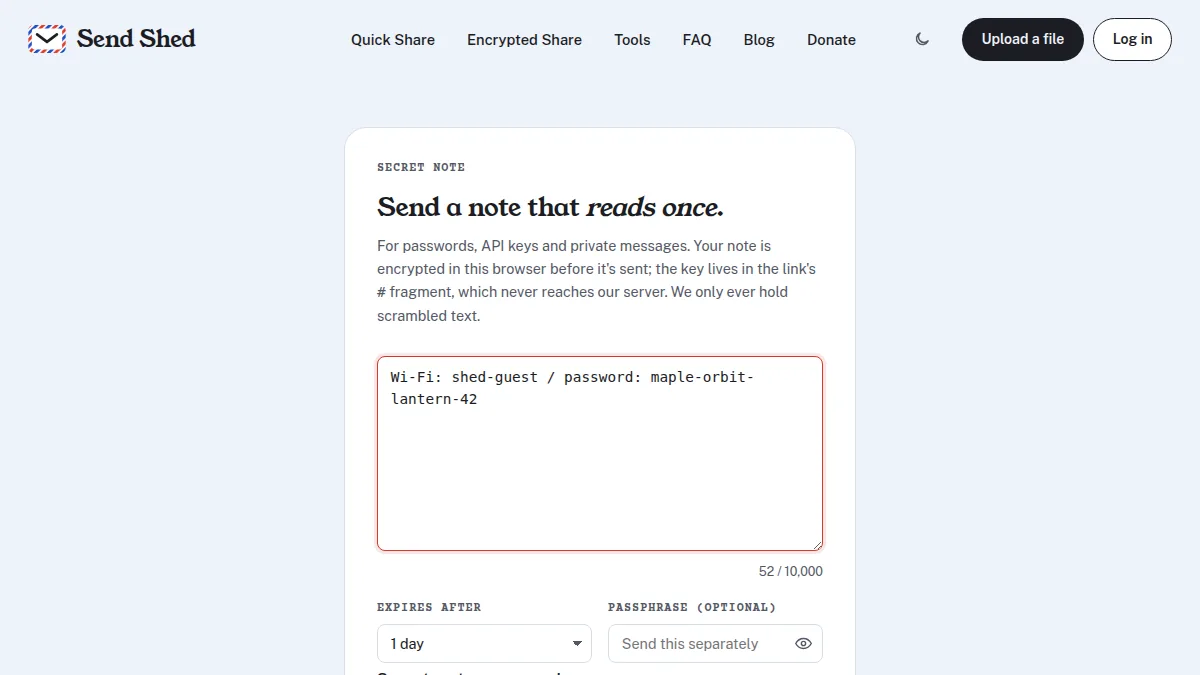
- Open sendshed.com/note and type or paste the secret (up to 10,000 characters).
- Choose when an unread note expires: 1 hour, 1 day or 7 days.
- Optionally add a passphrase. Then the link alone can't open the note.
- Leave Delete the note after it's read once ticked, and press Encrypt & create link.
- Copy the link and send it. If you set a passphrase, send that another way, like a call or a different app.
No account is needed on either side.
What happens to it
- It's encrypted in your browser with AES-256-GCM and a fresh random key. The key goes in
the link after the
#, which browsers never send to a server, so Send Shed only ever stores scrambled text. - It's deleted when it's read. Opening the link again says the note has already been read.
- Link previews can't use it up. The recipient presses Reveal note first, so a chat app fetching the link for a preview doesn't count as a read.
- A passphrase adds a second lock. The key is also derived from the passphrase (PBKDF2-SHA256, 600,000 rounds). A wrong passphrase reveals nothing and doesn't use up the note; after 10 wrong tries it's locked for good.
- Unread notes don't linger. They're deleted at the expiry you chose.
When to use it, and when not to
- Good for: passwords and Wi-Fi keys, API tokens, recovery codes, account numbers, a private message you don't want sitting in a chat log.
- Not for files. For a document or photo, use Encrypted Share, which encrypts files the same way.
- Not a replacement for changing the password. If a shared secret matters, have the other person change it once they've used it.
How the encryption itself works: zero-knowledge encryption, explained.
Sending a file rather than a password? Self-destructing file links delete the file after one download.
Quick answers
What is the safest way to send a password?
Use a one-time note that is encrypted before it is sent and deleted after it is read, and send any passphrase through a different channel. Then nothing readable stays in an inbox or chat history.
Can Send Shed read my secret note?
No. The note is encrypted in your browser and the key is in the part of the link after the #, which is never sent to the server. Send Shed only stores encrypted text.
What happens if a chat app previews the link?
Nothing is used up. The note only opens when the recipient presses Reveal note, so link previews can't burn a one-time note.
How long does a secret note last?
Until it is read, or until the expiry you choose: 1 hour, 1 day or 7 days. Then it is deleted.