Add a passphrase to an encrypted link, so a leaked link isn't enough
An Encrypted Share link carries its own key, which makes it easy to send but means anyone who sees the link can open the file. Adding a passphrase locks that key, so the file only opens for someone who has both.
Two ways to lock a file
| Password (Quick Share) | Passphrase (Encrypted Share) | |
|---|---|---|
| Who checks it | Send Shed's server | The recipient's browser |
| Can Send Shed open the file? | Yes, it stores the file as is | No, it only holds encrypted data |
| If it's forgotten | Upload again with a new password | Nobody can recover it |
| Best for | Keeping a link from casual visitors | Confidential files |
The password guide covers the first kind. This is about the second.
How to add one
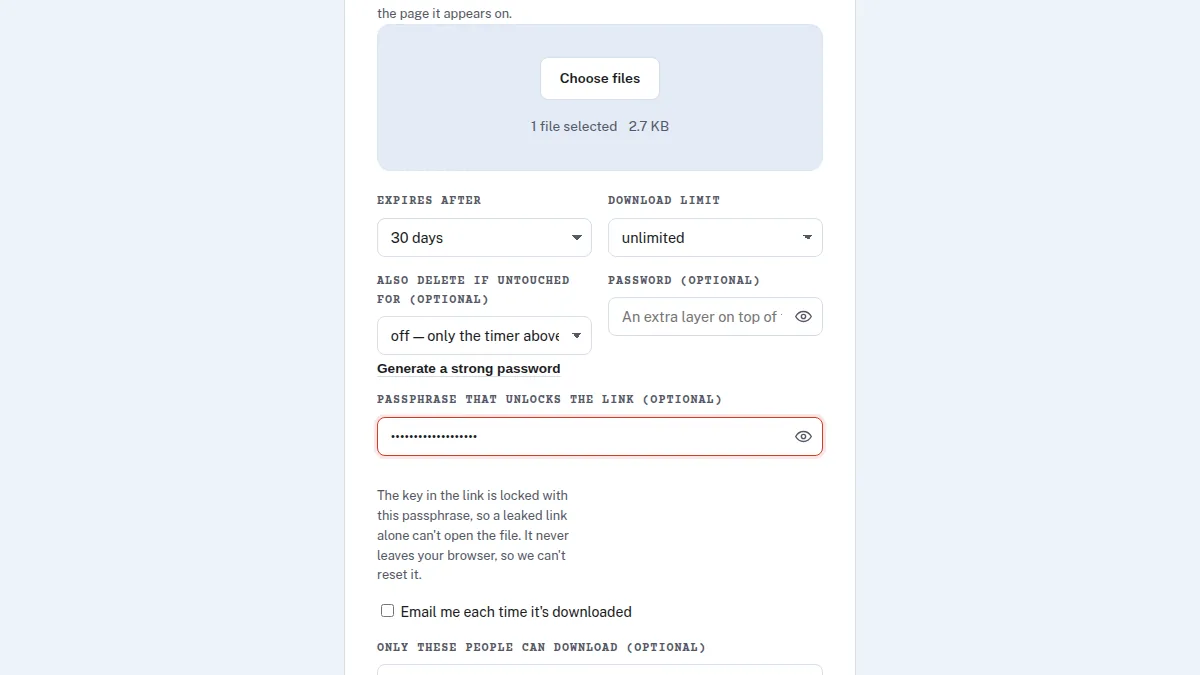
- Open Encrypted Share and choose your files.
- Fill in Passphrase that unlocks the link. Use three or four unrelated words, or a long random string.
- Upload, then send the link and the passphrase by different routes: the link by email, say, and the passphrase by text or a call.
The recipient opens the link, types the passphrase, and the file decrypts in their browser.
What it actually does
Normally the link's # part holds the key that decrypts the file. With a passphrase, your browser locks
that key with a second key derived from the passphrase (PBKDF2-SHA256, 600,000 rounds), and the link carries the
locked version. Without the passphrase, the link is useless. The passphrase itself never leaves your browser, which
is why Send Shed can't reset it.
Choosing a passphrase
- Longer beats clever. Four random words is stronger than a short password with symbols.
- Don't reuse one from an account.
- Links made before this feature keep working exactly as before.
How the encryption itself works: zero-knowledge encryption, explained.
Quick answers
What is the difference between a password and a passphrase on Send Shed?
A Quick Share password is checked by the server, which can read the file. An Encrypted Share passphrase locks the decryption key in the browser, so the server never can.
Can Send Shed reset a forgotten passphrase?
No. The passphrase never reaches the server, so there is nothing to reset. Upload the file again with a new one.
Should I send the passphrase with the link?
No. Send them by different routes, so someone who sees one doesn't get both.
Lock a file with a passphrase
Encrypted in your browser; the passphrase never leaves it.
Open Encrypted Share Send a secret note